

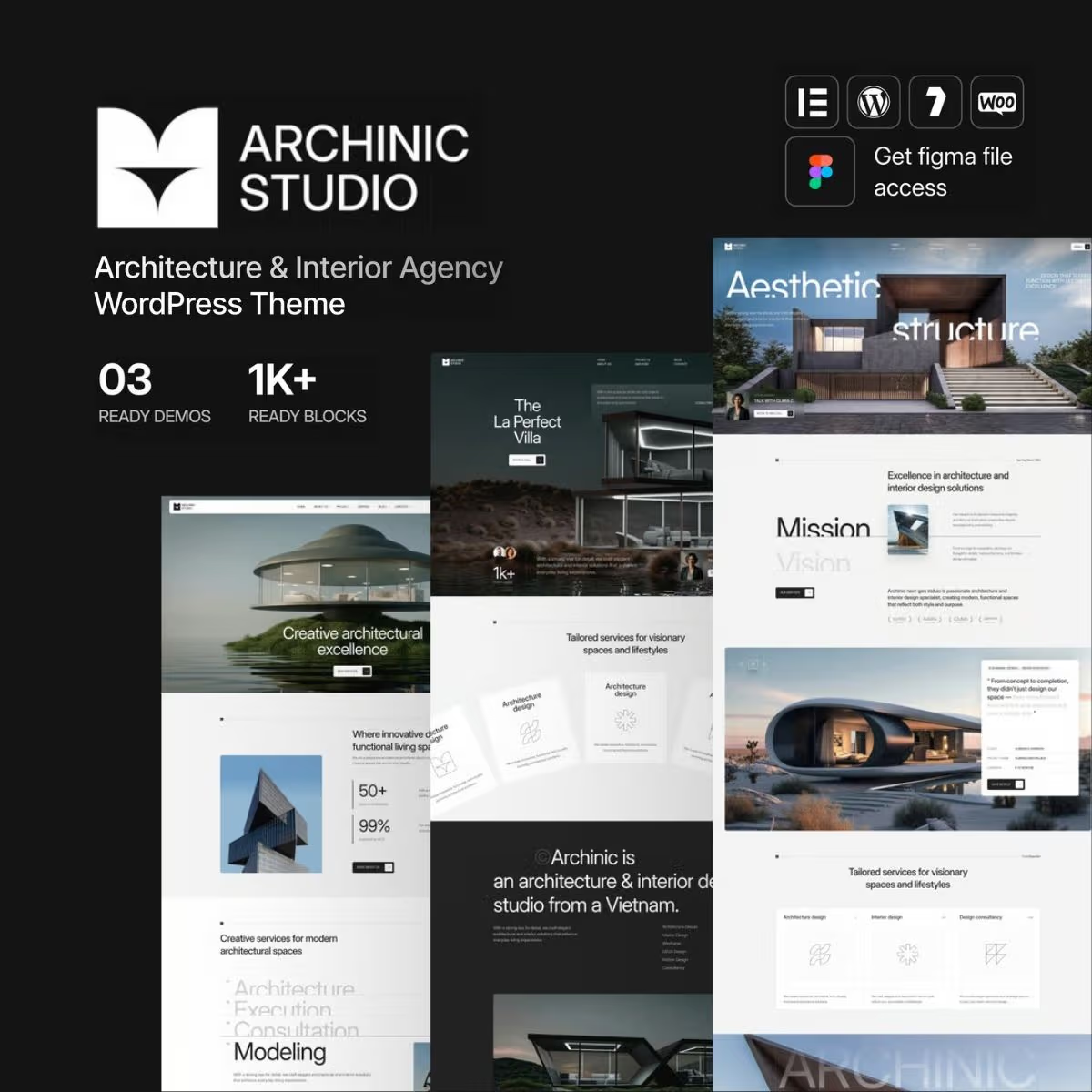
Archinic – Architecture and Interior Agency WordPress Theme
- Very cheap price & Original product !
- 100% Clean Files & Free From Virus
- Unlimited Domain Usage
- Free New Version
- Product Version :
- Product Last Updated : 19.07.2026
- License : GPL
$3.99
Description
Archinic – Architecture and Interior Agency WordPress Theme
Archinic is a modern WordPress theme designed for architecture studios, interior design agencies, construction businesses, creative professionals, property developers, and related service providers. It gives you a polished foundation for presenting projects, services, portfolios, team profiles, and company information with a professional visual identity.
Built for businesses that depend on strong presentation, Archinic helps turn your WordPress website into a compelling digital portfolio and lead-generation platform. Its flexible layouts and visual-focused design make it suitable for showcasing architectural work, interior concepts, completed projects, design services, and creative case studies.
Feature Highlights
- 🏛️ Architecture & Interior Design Focused: Purpose-built design direction for architecture studios, interior agencies, decorators, and creative design businesses.
- 🎨 Portfolio-Centric Presentation: Showcase projects, case studies, concepts, and completed work in a visually engaging format.
- 📱 Responsive Design: Create a professional browsing experience across desktops, tablets, and mobile devices.
- 🧩 Flexible Page Layouts: Build pages for services, about sections, portfolios, teams, contact information, and business content.
- ⚡ Professional Business Foundation: Present your agency with a structured design that supports credibility and brand positioning.
- 🛒 WooCommerce Ready: Suitable for businesses that want to extend their website with online commerce capabilities where supported by the theme setup.
- 🔧 WordPress Customization: Adapt typography, colors, content, imagery, menus, and other visual elements to your brand.
- 🚀 Agency-Friendly Structure: A practical foundation for developers building websites for studios, agencies, freelancers, and design-focused companies.
Detailed Overview
For architecture and interior design businesses, your website needs to communicate more than a list of services. It needs to demonstrate your visual style, attention to detail, previous work, and professional approach. Archinic is designed around that requirement, giving creative businesses a strong platform for turning projects into persuasive digital presentations.
Use the theme to build a website for an architecture firm, interior design studio, construction company, home renovation service, furniture or décor business, property development agency, or creative consultancy. Organize your website around the information prospective clients need: what you do, what you have delivered, who you are, and how visitors can contact you.
Project-focused content can help communicate your expertise through photographs, descriptions, project details, and case-study style presentations. Combined with clear service pages and calls to action, this makes Archinic a practical choice for agencies looking to establish authority and generate new enquiries online.
From a developer perspective, the theme provides a reusable foundation that can be adapted to different client brands. Replace the demo-oriented content with your own imagery, project descriptions, services, contact details, and brand assets to create a website that feels specific to the business.
Archinic vs. Generic WordPress Themes
| Capability | Archinic | Generic Business Theme | Basic Portfolio Theme |
|---|---|---|---|
| Architecture & interior design positioning | ✓ Purpose-focused | △ Requires customization | △ Limited business focus |
| Project and portfolio presentation | ✓ Core use case | △ Varies | ✓ Usually supported |
| Agency/business website structure | ✓ | ✓ | △ May require adaptation |
| Responsive presentation | ✓ | ✓ Depends on theme | ✓ Depends on theme |
| Client project customization | ✓ | ✓ | ✓ |
| WooCommerce compatibility | ✓ Where supported | △ Theme-dependent | △ Theme-dependent |
Why choose a specialized theme? Generic themes can require considerable time to reshape around an architecture or interior design workflow. Archinic starts with a creative-agency-oriented foundation, helping developers and business owners focus on content, branding, projects, and conversions instead of rebuilding the entire visual direction from scratch.
Installation Guide
- Prepare WordPress: Install and configure a current WordPress installation on your hosting environment.
- Upload Archinic: From the WordPress dashboard, go to Appearance → Themes → Add New → Upload Theme and upload the theme ZIP package.
- Install the theme: Select the uploaded package, install it, and activate Archinic.
- Install required plugins: If the package includes or recommends companion plugins, install and activate them from the WordPress dashboard.
- Import starter content: If demo or starter content is provided, import it according to the theme documentation.
- Customize your website: Add your logo, colors, typography, menus, project images, services, contact information, and other business content.
- Review and launch: Test pages, navigation, forms, responsive layouts, and important links before publishing the finished website.
Licensing Information
Archinic is offered through wpshop.net in a GPL-oriented WordPress product model. The product is intended for use within the rights provided by the applicable GPL licensing terms.
- ✓ GPL-based access for WordPress use
- ✓ Suitable for personal and client website projects subject to the applicable license terms
- ✓ Lifetime free updates from wpshop.net while the product remains available through the service
- ✓ Limited support provided via email
Important: Third-party services, premium plugins, external APIs, hosting, domain registration, and other separately licensed components may have their own licensing requirements. Review the original product documentation and applicable third-party terms before deployment.
FAQs
What is Archinic used for?
Archinic is designed for architecture firms, interior design agencies, creative studios, construction-related businesses, property professionals, decorators, and other businesses that need a project-focused WordPress website.
Can I use Archinic for an interior design portfolio?
Yes. Its portfolio-oriented presentation makes it suitable for displaying interior projects, architectural work, case studies, concepts, completed spaces, and other visual work.
Is Archinic suitable for client projects?
It can be used as a foundation for client websites, subject to the applicable GPL terms and any separate licensing requirements for included or third-party components.
Is coding knowledge required to use the theme?
Basic WordPress knowledge is generally enough for common setup and customization tasks. Developers can further customize the theme when a project requires deeper design or functionality changes.
Does wpshop.net provide support and updates?
wpshop.net provides limited support via email and lifetime free updates for the product while it remains available through the service.
Can Archinic be used with WooCommerce?
Archinic can be suitable for WooCommerce-based projects where WooCommerce compatibility is supported by the theme configuration and required components. Always verify the current product documentation for exact compatibility details.
Why Choose Archinic?
Archinic is a practical choice when visual presentation and project credibility are central to your business website. Instead of starting with a generic layout and redesigning it around an architecture or interior agency, you get a focused foundation for presenting projects, services, expertise, and brand identity.
For business owners, it provides a professional starting point for establishing an online presence. For WordPress developers, it offers a reusable base that can be adapted for architecture firms, interior studios, creative agencies, and related client projects.
Build a polished architecture or interior design website without starting from zero. Choose Archinic from wpshop.net, customize it around your brand and portfolio, and create a professional WordPress presence designed to turn your work into a stronger digital business asset.
You must be logged in to post a review.

Reviews
There are no reviews yet.